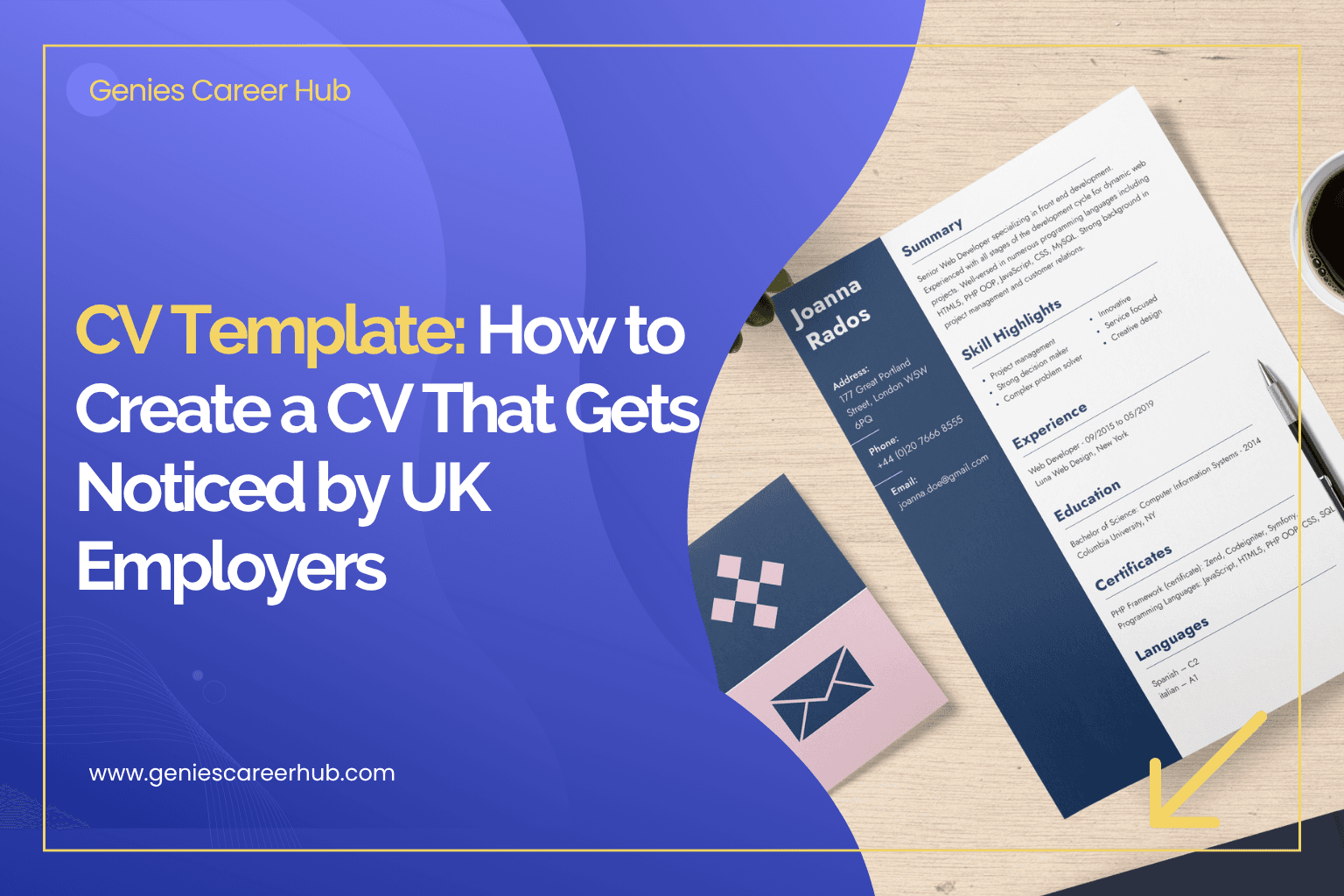
CV Template: How to Create a CV That Gets Noticed by UK Employers
Orlaigh Smyth
Author
"Discover the strategies used by top product teams."
Looking for a CV template? Learn how to create a professional UK CV, what sections to include and how to make your CV stand out to recruiters.
CV Template: Create a Professional CV for UK Jobs
A strong CV can make a significant difference to your job search. It is often the first opportunity you have to show an employer what you can offer. Before you reach an interview, a recruiter may use your CV to decide whether your experience, skills and background are relevant to the role. This is why choosing the right cv template matters. However, a good CV is about much more than its design. A professional template should make your experience easy to understand, highlight your most relevant achievements and present your information in a clear structure. Whether you are applying for your first job, changing careers or looking for your next senior position, the right CV structure can help you communicate your value more effectively. A cv template is a pre-designed structure that provides a framework for creating your CV. It can help you organise important information such as: Personal details Professional profile Employment history Skills Education Qualifications Certifications Achievements Relevant projects Using a template can save time because you do not need to design the entire document from scratch. However, the template should support your content rather than distract from it. A highly designed CV may look impressive but become difficult for recruiters or applicant tracking systems to read. Recruiters can receive a large number of applications for a single position. They need to quickly identify candidates who meet the requirements. A clear CV makes this easier. A good template should have: Clear headings Consistent formatting Easy-to-read fonts Logical sections Appropriate spacing Strong visual hierarchy Simple navigation The goal is not to create the most colourful CV. The goal is to make your relevant experience immediately understandable. Before choosing a cv template cv, understand what information your CV should contain. A typical UK professional CV can include: Include: Name Phone number Professional email address LinkedIn profile Location, where relevant You generally do not need to include personal information such as your date of birth, marital status or a photograph unless specifically relevant to the role or industry. Your professional profile should provide a concise overview of who you are and what you offer. For example: Experienced project manager with a background in delivering complex technology projects across cross-functional teams, specialising in stakeholder management, process improvement and operational delivery. Keep the profile relevant to the position you are applying for. List your relevant experience in reverse chronological order. For each position, include: Job title Employer Dates Key responsibilities Achievements Focus on results wherever possible. Include skills relevant to the job. These might include: Project management Leadership Data analysis Communication Digital marketing Software development Customer relationship management Avoid filling this section with generic skills that do not demonstrate value. Include relevant qualifications and educational achievements. For experienced professionals, this section does not necessarily need to dominate the CV. Focus on information relevant to your career. There is no single rule that applies to every professional. For many UK job applications, a concise CV of around two pages is a useful target. However, experienced professionals may need additional space to communicate relevant achievements. The important principle is relevance. Do not include information simply to make the CV longer. If an experience does not help demonstrate your suitability for the role, consider removing or reducing it. Many job seekers search for a cv template google docs because Google Docs makes it easy to create and edit documents online. A Google Docs CV template can be useful if you want: Easy editing Cloud storage Simple collaboration Quick formatting Access across different devices Google Docs can be a practical starting point for creating a CV. However, the quality of the final CV depends on how you structure and customise the content. A template should never replace thoughtful CV writing. A google docs cv template can work well for a straightforward CV. However, professionals with more complex experience may benefit from a more targeted approach. For example, if you are: Changing careers Applying for senior roles Moving into a new industry Applying internationally Targeting a highly competitive position you may need more than a basic template. Your CV needs to tell a clear professional story. That means choosing the right achievements, skills and language for your target role. When choosing a cv template, consider the industry and role. A clean and traditional design is usually appropriate for sectors such as: Finance Consulting Law Professional services Management Operations Creative professionals may have more flexibility with design. However, readability should still be a priority. Technology CVs should make technical skills, projects and achievements easy to identify. Do not overcrowd the document with graphics. Senior professionals should prioritise strategic achievements, leadership experience and business outcomes. The template should communicate professionalism rather than excessive design. Many employers use applicant tracking systems (ATS) to manage recruitment applications. An ATS may scan CVs for information relevant to a job. This makes simple formatting particularly important. Avoid excessive: Graphics Text boxes Tables Decorative elements Unusual fonts Complex layouts Use clear headings and standard terminology where appropriate. If the job description says Project Manager, do not rely only on an unusual alternative such as “Delivery Specialist” if you have relevant project management experience. Using language that reflects the vacancy can make your experience easier to identify. A template should be a starting point. Do not send the same CV to every employer. Read the job description carefully and identify: Required skills Preferred experience Responsibilities Industry knowledge Qualifications Keywords Then adjust your CV accordingly. For example, if a job repeatedly mentions stakeholder management, make sure relevant stakeholder-management achievements are visible in your CV. One of the most important improvements you can make to any cv template cv is replacing generic responsibilities with measurable achievements. Compare: Responsible for managing a sales team. with: Managed a team of eight sales professionals and increased quarterly revenue by 18%. The second example communicates responsibility and results. Whenever possible, use numbers. Consider: Revenue Cost savings Time saved Team size Customer growth Conversion rates Projects delivered Efficiency improvements Numbers help employers understand the impact of your work. Your profile should quickly answer three questions: Who are you? What are you good at? What value can you bring? Avoid vague statements such as: Hard-working individual with excellent communication skills looking for a challenging opportunity. This could apply to almost anyone. Instead, focus on your actual experience and professional strengths. A professional CV should look consistent throughout. Use the same: Font Heading style Date format Spacing Bullet style For example, do not use three different date formats throughout your employment history. Consistency makes the document easier to read. A small amount of colour can be acceptable depending on your industry. However, your CV should remain professional and readable if printed in black and white. Avoid using colour simply to make the document look more exciting. Content should remain the priority. A CV is not a poster. Excessive graphics can make information harder to find. More information does not automatically mean a stronger CV. Prioritise relevance. Avoid phrases that do not demonstrate anything specific about your experience. Different roles require different emphasis. Show what changed because of your work. Your CV should respond to what the employer is actually looking for. The best way to use a template is to treat it as a framework. Start with the structure. Then customise: Professional profile Employment history Achievements Skills Keywords Relevant projects Your final CV should reflect your career rather than looking like a generic document downloaded from the internet. A cv template can be particularly useful when changing careers. The challenge is that your previous job title may not immediately match the role you want. Your CV therefore needs to highlight transferable skills. For example, if you are moving from recruitment into HR, focus on relevant skills such as: Candidate management Stakeholder relationships Interviewing Employee communication Process management Explain how your previous experience connects to your new career. If you are unsure how to position your experience, Genies Career Hub's Career Coaching can help you gain clarity around your career direction. Finding a template is only the first step. Your CV still needs to communicate your professional value. Genies Career Hub's CV Studio can help you create a stronger, more targeted CV rather than relying solely on a generic document template. This can be particularly useful when you are applying for competitive roles or changing your career direction. You can also explore GeniesJobs to find relevant job opportunities and understand the types of skills employers are currently looking for. Before submitting your CV, check: Is the formatting consistent? Is the contact information correct? Is the professional profile relevant? Are the most important achievements easy to find? Have you included relevant keywords? Is the document easy to read? Have you removed unnecessary information? Does it match the job description? Are there spelling or grammar mistakes? Does the file name look professional? A final review can prevent simple mistakes from damaging an otherwise strong application. A cv template can make creating a professional CV much easier, but the template itself is not what gets you the interview. Your content matters most. Choose a clear structure. Highlight relevant experience. Focus on achievements. Use language that reflects the role you are targeting. Keep the formatting simple and professional. If you are using a cv template google docs, treat it as a starting point rather than a finished CV. Customise it around your experience and the specific opportunities you are targeting. For professionals who want more support, Genies Career Hub's CV Studio can help you build a CV that presents your experience more effectively. You can then explore GeniesJobs to find your next opportunity and use Career Coaching if you need additional guidance with your career direction. A good CV does not need to be complicated. It needs to make the right information clear, relevant and easy for an employer to understand.What Is a CV Template?
Why Does Your CV Template Matter?
What Should a UK CV Include?
Contact Information
Professional Profile
Employment History
Skills
Education and Qualifications
How Long Should a CV Be?
CV Template Google Docs: Is It a Good Option?
Google Docs CV Template vs Professional CV Tools
How to Choose the Right CV Template
Corporate and Professional Roles
Creative Roles
Technology Roles
Senior Leadership Roles
Make Your CV ATS-Friendly
Tailor Your CV to Every Job
Focus on Achievements
Write a Strong Professional Profile
Keep Your Formatting Consistent
Should You Use Colour?
Common CV Template Mistakes
Using Too Much Design
Including Too Much Information
Using Generic Statements
Sending the Same CV Everywhere
Listing Responsibilities Without Results
Ignoring the Job Description
Use a CV Template as a Starting Point
Creating a CV for a Career Change
Use Genies Career Hub's CV Studio
Check Your CV Before Applying
Final Thoughts
More to Read
Create a Professional Resume with a Google Docs Resume Template
Want to create a professional resume? No need to spend an hour fixing margins, fonts, and page layouts. Learn more from us.
Cover Letter Sample: How to Write a Professional Cover Letter
Your final letter should reflect your own experience, achievements, and career goals. Learn more about it.
Create a Professional CV Online for Free
Looking for a new professional CV maker? Use a free CV maker that helps you create a well-designed CV without advanced design and formatting skills.
CV Checker: How to Check and Improve Your CV for UK Jobs
Exlore how a cv checker works, what an ats cv checker can identify, how an ai cv checker can help, and what to look for when using a cv ats checker.
Human Resources Departments: Roles, Responsibilities and Importance
Explore the responsibilities of human resources departments, common human resources department roles, and how HR contributes to successful organisations.